

Your child’s age narrows which activities come up in the activity library, and it goes to PLAI™ with your question when you ask for an idea. Judging whether something actually fits them is still yours.
Where age gets used
The first is the list. Activities carry an age band, and your child’s age narrows which ones are eligible, in the activity library and when you ask for something to do. If their birth month and year are recorded, that age is worked out in months rather than rounded to the nearest year.
The second is the reply. PLAI™ writes its answers using an AI language model, and your selected child’s age goes to it along with your message and the goals and hobbies on their profile.
Age doesn’t guarantee particular wording or a particular set of steps, and it isn’t a measure of what your child can do. You can also say what you need: tell it you’ve got ten minutes and a kitchen table, and ask for easier steps, more help from you, or something harder. How to ask PLAI™ covers the asking in more detail.
Using age in the library
Open the filters in the activity library and the first section is Age.
There are two sliders, Minimum age and Maximum age, in whole years from 0 to 14. Below them, signed in with an eligible child profile selected, there’s a button with your child’s name and their age in years and months.
The two work differently. The child button uses that exact recorded age against each activity’s band. The sliders pull in anything whose band overlaps any part of the range you set, so a wide range doesn’t mean everything in it will suit one child.
Only one of them is active at a time. Select the child button and the slider handles move to the full range. Move a handle and the child button is deselected. Reset, signed in with an eligible child selected, returns the filter to that child, and the button at the bottom applies your choice and closes the panel.
The sliders change which activities the library lists. They don’t change your child’s recorded profile age, and they don’t change the age PLAI™ gets in chat.
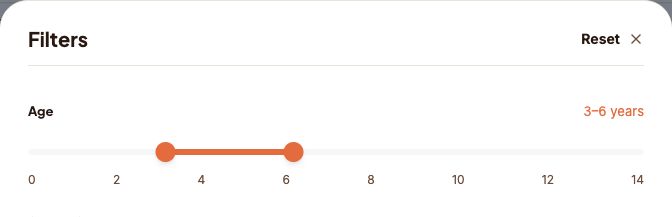
The sliders set by hand to 3 to 6 years.
Why age is only a starting point
Age is one thing to go on. What this child is interested in, what they have already done and what the day looks like are others, and early years guidance makes the same point.
The NAEYC core considerations set out three things to weigh together: what’s generally known about how children develop, what you know about this child’s strengths, interests and experience, and the social and cultural world around them. Children differ in what they like, what they’ve met before and the language they hear. That guidance covers birth through eight rather than every age.
The American Academy of Pediatrics review The Power of Play describes guided play, where the child keeps the lead and the adult supports with questions and comments, responding to what the child is doing.
Neither is a study of this product. They’re principles for supporting play rather than evidence about the filter or the replies.
Adjusting the challenge
Try I Spy with your 3 to 6 year old. All you need is something you can both see.
For a three-year-old just learning the game, you might ask for a version with one visible shape clue and a bit of help from you. For a six-year-old who likes inventing clues, you might ask for a version where they make the clue up themselves.
Those are examples of what you can ask for, not rules about either age. Either version could suit either child, depending on their interest and what they’ve played before.
I Spy
A player picks something in view and gives a non-colour clue about its shape, sound, use, or first letter for others to find.
Shaped to your child and the moment you are both in.
Before you start, it’s worth checking what you need for it, whether you can be alongside, what the instructions actually say, and whether they’re interested right now. You can make it simpler, change it, skip it or stop.